

Software platforms that automate how organizations identify, analyze, and prioritize cybersecurity risks, replacing manual, spreadsheet-based processes with structured, repeatable workflows
They help teams uncover vulnerabilities early, objectively assess likelihood and impact, and maintain ongoing visibility into their risk posture, all while aligning with frameworks like NIST, ISO 27001, SOC 2, HIPAA, and PCI DSS.
Automation, scalability, flexible reporting, and framework mapping are essential. The best cybersecurity risk assessment tools provide centralized dashboards, remediation tracking, and built-in compliance alignment.
Multi-tenant design enables service providers to assess, monitor, and report on multiple clients from one platform, improving efficiency, accuracy, and profitability without adding headcount.
Cynomi is the only AI-powered risk assessment solution built specifically for MSPs and MSSPs, automating every stage of the process – from initial evaluation to remediation planning, while embedding real CISO expertise into each step.
Security risk assessment tools have become indispensable for modern cybersecurity programs. As threats grow more complex and regulations more demanding, organizations need a faster, more structured way to identify and manage security risks. Cybersecurity risk assessment tools and automated risk assessment tools replace manual, error-prone processes with consistent, scalable evaluations that support informed decision-making and compliance. For managed service providers (MSPs) and MSSPs, these platforms make it possible to efficiently deliver CISO-level insights across multiple clients.
In this article, we’ll explore what these tools do, the features that define the best security risk assessment tools, and the leading solutions in the market today.
What Do Automated Risk Assessment Tools Do?
At their core, automated risk assessment tools are designed to make cybersecurity risk management faster, more consistent, and less dependent on manual effort. Instead of relying on static spreadsheets or subjective scoring, these platforms centralize data from across environments, systems, networks, users, and policies, and automatically apply structured risk analysis tools and methodologies to identify potential threats and vulnerabilities.
Modern cybersecurity risk assessment tools typically follow a repeatable process that mirrors the principles of standard risk frameworks such as NIST SP 800-30, ISO 27005, or FAIR. They collect and normalize data, evaluate the likelihood and potential impact of security events, and calculate an overall IT security risk score or posture rating. This enables teams to quantify exposure, track trends over time, and prioritize remediation based on real risk levels rather than intuition.
Beyond analysis, advanced security risk assessment tools generate detailed visual dashboards and reports that translate technical findings into actionable insights for business stakeholders. Many also include built-in policy recommendations and workflow automation, helping teams document findings, assign mitigation tasks, and demonstrate compliance with key frameworks and standards.
By automating these processes, IT security risk assessment tools allow security and compliance teams to focus on strategy and improvement rather than data entry. The result is a streamlined and scalable approach to understanding and reducing cyber risk, either across a single organization or across dozens of managed clients.
Essential Features of Top Risk Assessment Tools
The best security risk assessment tools combine automation, structure, and actionable intelligence to make the complex process of evaluating cyber risk more efficient and repeatable. While each platform offers its own flavor, the leading solutions share a common foundation of capabilities that help organizations and service providers deliver measurable results faster. Core capabilities include:
Customizable Templates and Questionnaires
Top cybersecurity risk assessment tools provide prebuilt templates aligned with frameworks such as NIST, ISO 27001, SOC 2, and HIPAA. Users can easily adapt them to fit industry-specific requirements or client needs, ensuring assessments stay standardized yet flexible.
Automated Risk Scoring and Prioritization
By using built-in algorithms that weigh likelihood and impact, modern IT security risk assessment tools automatically calculate risk scores and prioritize remediation efforts. This ensures consistent results and helps teams focus on the most critical vulnerabilities first.
Real-Time Dashboards and Visual Reporting
Dynamic dashboards translate technical risk data into easy-to-understand visuals. These real-time reports allow executives and clients to quickly gauge overall security posture and track progress over time, enhancing transparency and trust.
Framework and Control Mapping
Leading risk analysis tools simplify multi-framework compliance by automatically mapping risks, controls, and policies across standards. This saves hours of manual work and supports continuous compliance.
Remediation Planning and Task Tracking
Leading tools don’t stop at detection. They also help plan, assign, and track remediation steps. Built-in workflows ensure accountability and make it easy to demonstrate progress to auditors or clients.
Centralized Risk Register and Data Management
Consolidating all risk data into a single source of truth allows teams to consistently manage assessments across multiple environments or clients. This structured repository also improves audit readiness and reporting accuracy.
Multi-Tenant Management for MSPs and MSSPs
For managed service providers, multi-tenant functionality is essential. It allows centralized oversight of all client environments, enabling efficient scaling and standardized delivery of risk assessment and management services.
Advanced Features (Nice to Have)
The most innovative security risk assessment tools go beyond automation to deliver predictive insights and deeper integration across the security stack.
- AI-Powered Recommendations: Machine learning models suggest remediation steps or prioritize risks based on real-world data trends.
- Continuous Monitoring and Integrations: API connections with vulnerability scanners, SIEMs, and cloud environments feed live risk data into the assessment engine.
- Automated Executive Summaries: One-click generation of tailored, presentation-ready reports for clients or leadership teams.
- Collaboration and Workflow Tools: Shared workspaces allow technical teams, executives, and clients to align on priorities.
- Third-Party Risk Modules: Extend visibility to vendors and supply chain partners for a complete enterprise risk picture.
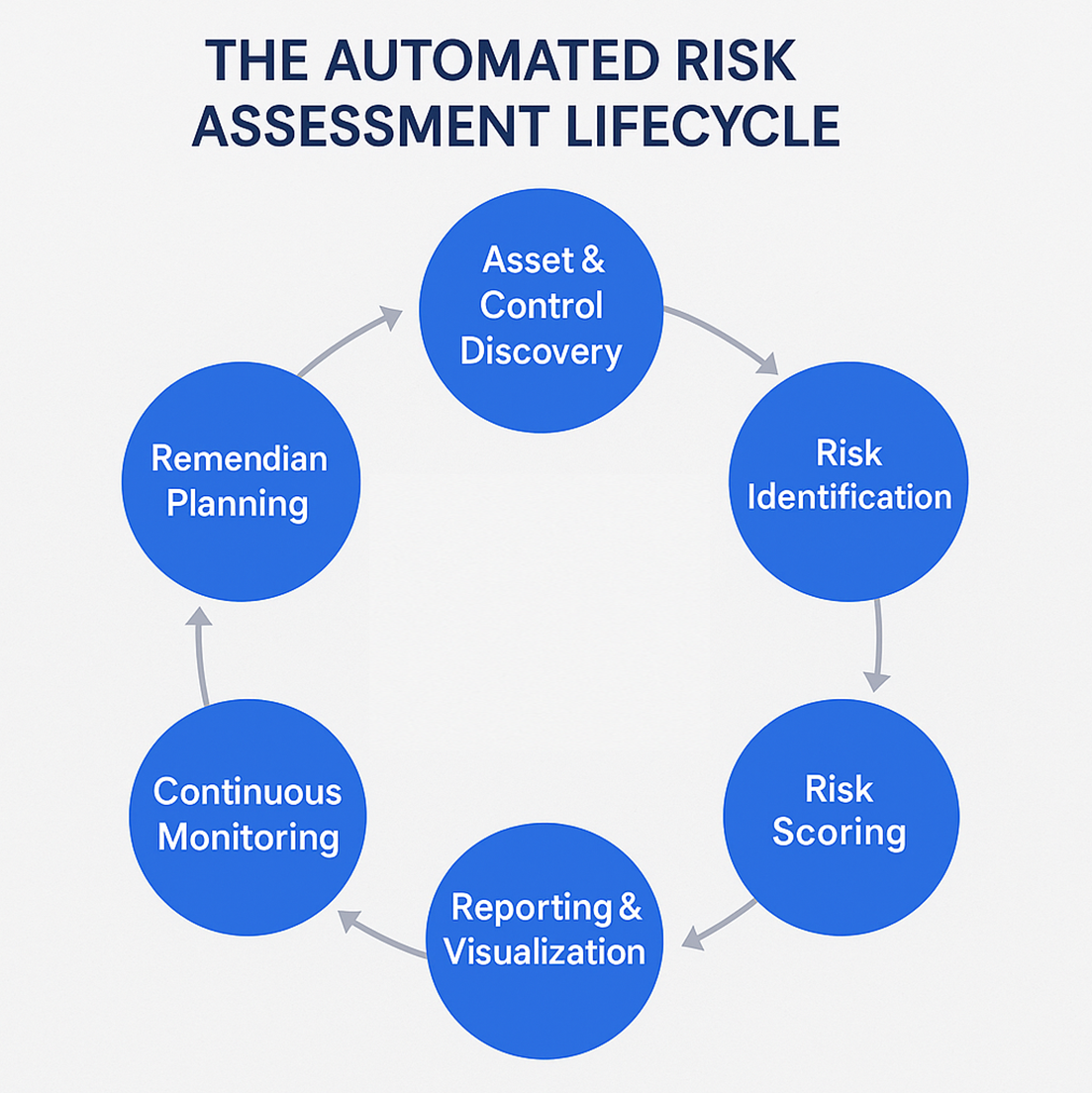
identify, score, remediate, and continuously monitor cybersecurity risks.
Top 10 Security Risk Assessment Tools for 2026
Below are 10 of the leading security risk assessment tools to consider in 2026. Each one helps organizations and service providers identify, analyze, and prioritize cybersecurity risks more efficiently, automating data collection, scoring, and reporting to replace manual, spreadsheet-based workflows. While all deliver measurable improvements in visibility and decision-making, their strengths, scalability, and ideal use cases vary.
1. Cynomi
Website: cynomi.com
Main Features:
- AI-powered vCISO and automated risk assessment workflows
- Automated assessments and remediation plans
- Multi-framework mapping
- Client-ready reporting dashboards
Best For: Managed service providers and consultancies seeking to deliver risk assessment and compliance services across multiple clients who need a multi-tenant, repeatable platform.
Pricing: Contact sales for a custom quote.
The Verdict:
⭐⭐⭐⭐⭐ Built specifically for service providers to scale professional risk assessments across customer portfolios.
Click to read Cynomi reviews.
2. Apptega
Website: apptega.com/
Main Features:
- Assessment Manager – to automate security and compliance assessments with built-in templates.
- Risk Manager – integrates assessments, risk tracking, framework cross-walking (e.g., NIST, ISO).
- Third-Party Risk / Vendor Risk Manager – automated questionnaires, vendor scoring, and continuous monitoring.
Best For: MSPs/MSSPs and internal security/compliance teams who want a cost-effective, full lifecycle assessment-to-action solution with framework coverage.
Pricing: Contact sales for a custom quote.
The Verdict: ⭐⭐⭐⭐Strong value for service-providers looking to scale risk assessments and compliance automation.
Click to read Apptega reviews.
3. LogicGate Risk Cloud (by LogicGate)
Website: logicgate.com
Main Features:
- No-code GRC/risk platform with dynamic workflow builder and configurable applications.
- Automated risk assessments, mitigation workflows, evidence collection, and real-time dashboards.
- Quantify and communicate financial risk via open FAIR™ model, Monte Carlo simulations.
Best For: Enterprises and mature risk programs needing a highly configurable, scalable risk assessment and GRC tool.
Pricing: Contact sales for a custom quote.
The Verdict: ⭐⭐⭐⭐Excellent for structured and sophisticated risk assessment automation across the enterprise.
Click to read LogicGate reviews.
4. AuditBoard
Website: auditboard.com
Main Features:
- Risk Management module: Identify, assess, respond, and centralize risk registers.
- IT Risk Management: Quantify cyber/IT risks, use automated assessment and treatment workflows.
- AI-powered connected risk platform: Integrate audit, risk, and compliance for a unified view.
Best For: Large organizations (including Fortune 500) seeking an enterprise-grade risk assessment and management platform that covers IT, operational, audit, and compliance risk.
Pricing: Contact sales for a custom quote.
The Verdict:
⭐⭐⭐⭐⭐Top tier for full-scale risk assessment, especially if you need both audit and IT risk features.
Click to read AuditBoard reviews.
5. RiskWatch International
Website: riskwatch.com
Main Features:
- Risk assessment platform for security & compliance – automates assessment workflows, uses intelligent analysis methodology.
- Pre-built content libraries (40+) aligned to standards and regulations.
- Focus on speed: claims increase in efficiency vs manual processes.
Best For: Organizations in regulated industries that need structured assessments of cybersecurity, physical security, and compliance across frameworks.
Pricing: Contact sales for a custom quote.
The Verdict: ⭐⭐⭐⭐Strong choice for structured risk assessment across security and compliance, with proven methodology.
Click to read RiskWatch reviews.
6. OneTrust
Website: onetrust.com
Main Features:
- IT Risk & Compliance module – dashboards for KRIs, exposure analysis, and assessment templates.
- Tech Risk & Compliance solution – process automation, frameworks coverage (NIS-2, ISO, etc).
- Third-Party Risk Management – vendor assessment workflows, risk inventory, continuous monitoring.
Best For: Enterprises that need broad risk assessment, especially around privacy, tech risk, and third-party risk as part of a unified platform.
Pricing: Contact sales for a custom quote.
The Verdict:
⭐⭐⭐⭐ Great for integrated risk assessment (tech, vendor, compliance) but may be heavier/complex for some MSP use-cases.
Click to read OneTrust reviews.
7. ProcessUnity
Website: processunity.com
Main Features:
- Risk Management Platform – unify risk processes, enhance compliance, and scalable workflows.
- Cybersecurity Risk Management (CSRM) – monitor cyber risks, improve controls, prioritize actions.
- Global Risk Exchange – vendor assessments and profiles to accelerate risk assessment tasks.
Best For: Organizations needing to integrate vendor/third-party risk assessment plus general cybersecurity risk assessment in one platform.
Pricing: Contact sales for a custom quote.
The Verdict: ⭐⭐⭐⭐ Solid for vendor and cyber risk assessment, especially where third-party exposure is large.
Click to read ProcessUnity reviews.
8. SAI360
Website: sai360.com
Main Features:
- Unified Risk Platform – centralized environment for enterprise, IT, cyber, and third-party risk assessments with consistent scoring and data models.
- Automated Workflows – configurable workflows that streamline risk identification, evaluation, and mitigation across multiple domains.
- Real-Time Analytics – dashboards that visualize key risk indicators (KRIs), control effectiveness, and remediation progress.
Best For: Enterprises and mid-sized firms looking for a unified platform for GRC, IT/cyber risk, third-party risk, and audit-readiness, especially where risk assessment must integrate multiple domains.
Pricing: Contact sales for a custom quote.
The Verdict: ⭐⭐⭐⭐ A comprehensive solution for multi-domain risk assessment and management, though it may be heavier and more complex than point solutions.
Click to read SAI360 reviews.
9. Archer Technologies
Website: archerirm.com
Main Features:
- IRM-GRC platform that supports policies, controls, risks, assessments, and deficiencies across the business.
- IT & Security Risk Management module – enables documenting and reporting IT risks/controls, linking threats, vulnerabilities, and regulatory obligations in one place.
- Centralized risk register, standardised assessment methodologies (likelihood/impact), workflow automation, and board-level reporting on risk posture.
Best For: Large enterprises or organizations with mature risk programs needing a robust, enterprise-grade solution for IT, enterprise, and operational risk assessment and monitoring.
Pricing: Contact sales for a custom quote.
The Verdict:
⭐⭐⭐⭐⭐ Top-tier tool for structured, enterprise-scale risk assessment, especially where integration with broader GRC is required.
Click to read Archer Technologies reviews.
10. Resolver
Website: resolver.com
Main Features:
- Risk Identification & Assessment – enables organizations to discover threats, evaluate likelihood and impact, and generate quantifiable risk scores.
- Automated Workflows & Real-Time Dashboards – provides configurable workflow automation for remediation tasks and live dashboards to visualize risk trends and control effectiveness.
- Third-Party & Vendor Risk Management – supports vendor onboarding, questionnaires, scoring, remediation tracking, and integrates vendor risk with broader IT risk and entity asset models.
Best For: Organizations of mid-to-large size that need a comprehensive risk assessment tool covering enterprise risks, IT/cyber risks, and vendor/third-party risks in one unified platform.
Pricing: Contact sales for a custom quote.
The Verdict:
⭐⭐⭐⭐ A strong all-round risk assessment and intelligence platform that brings together multiple risk domains into one view.
Click to read Resolver reviews.
How to Select the Best Security Risk Assessment Tool
With so many security risk assessment tools available, choosing the right one depends on your organization’s size, maturity, and goals. The ideal platform should deliver the capabilities you need while fitting your business model, resources, and maturity. The ideal solution should strengthen decision-making, reduce manual effort, and scale with your organization or client base.
Here are the key factors to consider when evaluating cybersecurity risk assessment tools:
Start with Your Core Objective
If your goal is to meet regulatory requirements, look for cybersecurity risk assessment tools that include built-in compliance mapping and automated reporting. But if you need to deliver managed security services at scale, prioritize multi-tenant design, templated workflows, and client-specific dashboards.
Consider the Balance between Automation and Control
Fully automated risk assessment tools eliminate repetitive work, but the best ones still allow customization for different industries or frameworks. Look for platforms that standardize risk scoring and reporting while letting you tailor inputs and thresholds to reflect real-world business context.
Evaluate Integration and Interoperability
The most effective IT security risk assessment tools integrate seamlessly with vulnerability scanners, ticketing systems, and SIEM or compliance platforms. A connected ecosystem ensures that assessments, findings, and remediation plans flow into one continuous lifecycle rather than living in isolation.
Think about Scalability and Usability
The best platform is the one your team, or your clients, will actually use. Prioritize solutions that combine intuitive workflows with centralized oversight, allowing junior analysts or account managers to execute consistent, repeatable assessments without extensive training.
Don’t Overlook ROI
Beyond price, measure total impact: time saved, clients added, and quality improved. The right tool should deliver measurable efficiency gains within weeks, not months, and open new service or upsell opportunities through structured, data-driven risk visibility.
Remember, the best security risk assessment tools balance automation, flexibility, and insight. They empower organizations and service providers to proactively manage risk, demonstrate value to stakeholders, and strengthen cybersecurity programs with less overhead.
Cynomi: The Premier Automated Risk Assessment Solution for MSPs
Cynomi redefines how managed service providers (MSPs) and managed security service providers (MSSPs) conduct and scale cybersecurity risk assessments. Purpose-built for the channel, its AI-powered vCISO platform automates and standardizes the entire risk assessment lifecycle – from initial discovery to reporting and remediation, enabling providers to deliver expert-level results with minimal manual effort.
Automated, Structured Risk Assessments
Cynomi’s risk engine translates complex cybersecurity data into actionable insights. It continuously identifies and prioritizes risks across assets, controls, and processes, assigning clear likelihood and impact scores. The platform automatically generates client-specific risk registers, gap analyses, and recommended remediation actions aligned with frameworks such as ISO 27001, SOC 2, HIPAA, and PCI DSS. Each assessment follows a standardized methodology infused with real CISO expertise, ensuring consistency across all clients and industries.
Scalable Delivery for Service Providers
Unlike traditional IT security risk assessment tools designed for single organizations, Cynomi was built for multi-client scalability. Its multi-tenant architecture allows MSPs and MSSPs to run parallel assessments for dozens of customers, monitor risk scores in real time, and manage all results from a single dashboard. This standardization not only improves accuracy and turnaround time but also enables providers to expand their risk assessment services without adding senior staff.
From Assessment to Remediation, Fully Automated
Cynomi goes beyond identifying risks. The platform automatically builds remediation plans, maps each task to the relevant controls, and tracks completion to demonstrate continuous improvement. With integrated policy generation and progress reporting, providers can show measurable risk reduction over time, strengthening client trust and compliance readiness.
Risk Assessment Tools: FAQs
A security risk assessment tool focuses specifically on identifying, scoring, and managing risks within IT and cybersecurity environments. A GRC (Governance, Risk, and Compliance) platform, on the other hand, covers a broader set of functions, including policy management, audits, and enterprise governance. Many organizations start with a dedicated risk assessment tool for visibility and prioritization, then integrate or scale into a full GRC solution as their maturity grows.
Most automated risk assessment tools use frameworks like NIST SP 800-30 or ISO 27005 to evaluate two key factors: likelihood and impact. They gather technical and procedural data from systems, controls, and policies, then assign weighted scores to produce a quantitative or qualitative risk rating. This data-driven approach reduces subjectivity and ensures consistency across assessments.
Not entirely. While cybersecurity risk assessment tools automate much of the data collection, scoring, and reporting, expert review remains essential. Security professionals provide context, interpreting results, validating assumptions, and deciding which mitigations align best with business goals. The strongest solutions, such as Cynomi, bridge this gap by embedding CISO-level logic into automated workflows, guiding even less-experienced teams through expert-grade assessments.
The best practice is to perform a comprehensive risk assessment at least once a year, and whenever major changes occur, such as new technologies, vendors, or regulations. Continuous or automated tools allow ongoing monitoring between formal assessments, ensuring that emerging risks are caught early and addressed proactively.
For service providers, efficiency and scalability are everything. Multi-tenant IT security risk assessment tools allow MSPs and MSSPs to manage multiple clients from one centralized platform, using standardized methodologies while tailoring each report to individual environments. This saves time, boosts margins, and ensures consistent quality across the client base.
Many organizations underestimate setup requirements, skip framework alignment, or fail to customize risk scoring to their specific environment. Others treat implementation as a one-time project rather than an ongoing process. Success depends on integrating the tool into daily workflows, defining ownership, and continuously updating risk data and control mappings.
Automation eliminates repetitive tasks such as data entry, evidence collection, and manual report building – significantly reducing time spent on each assessment. For MSPs and MSSPs, this translates directly into faster delivery, higher service capacity, and improved profit margins without expanding staff.
Quick Navigation
